
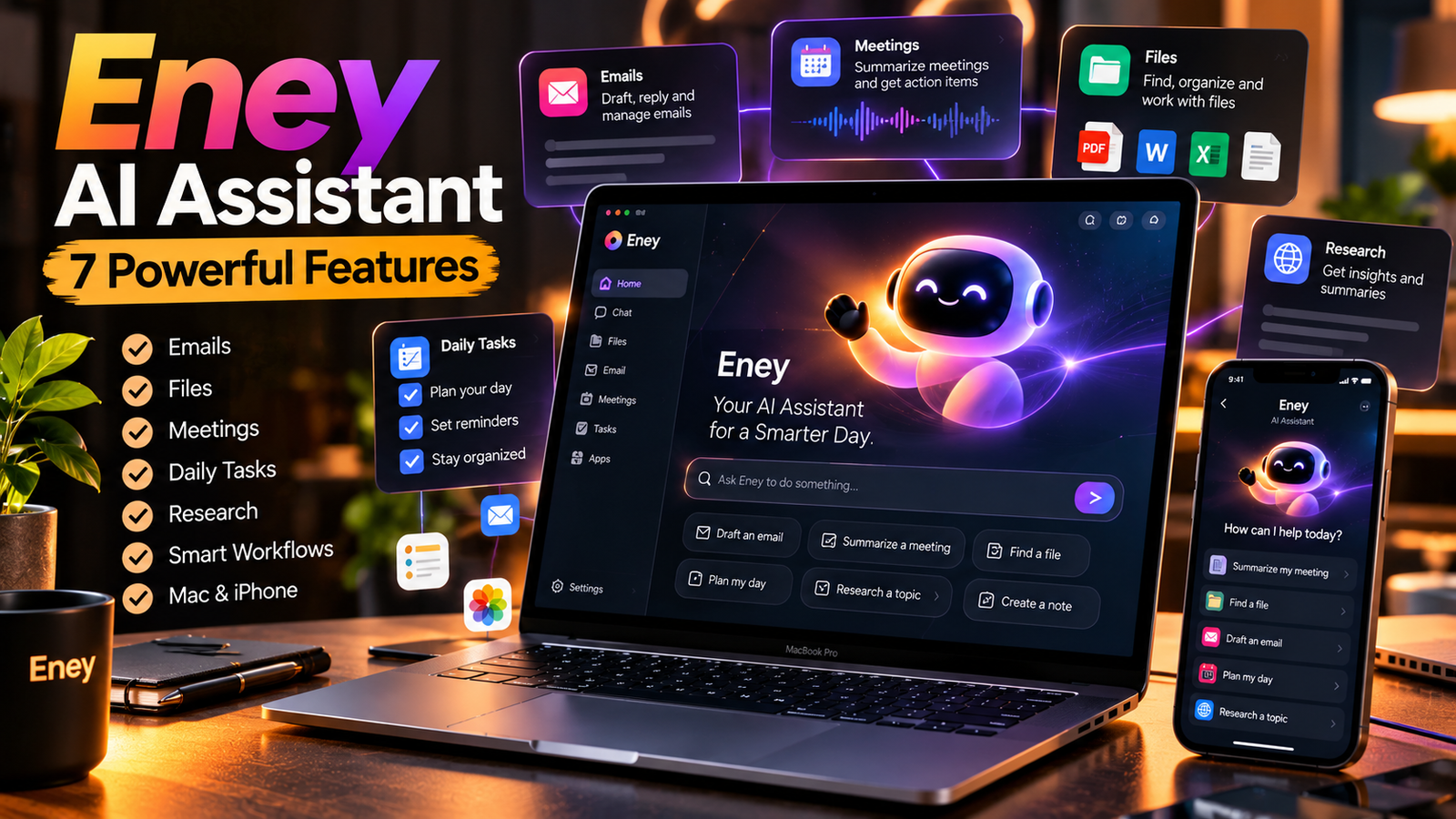
Digital work often means jumping between email, calendars, documents, files, meetings, and search tabs. Every switch costs attention, and small tasks can consume more time than expected. Eney AI Assistant is designed to reduce that friction by helping users move from a plain-language request to practical action across supported apps and workflows.
Created by MacPaw, Eney is a proactive AI assistant for Mac and iPhone. Rather than serving only as a chat window, it can help with tasks such as drafting messages, organizing information, summarizing meetings, working with files, and preparing research. Its exact capabilities depend on the app, permissions, connected services, and current product version, so users should check the official website before relying on a specific feature.
This guide explores the main features, benefits, compatibility requirements, privacy considerations, and potential limitations of Eney AI Assistant to help you decide whether it fits your daily routine.
What Is Eney AI Assistant?
Eney AI Assistant is a digital productivity tool from MacPaw that aims to help people complete everyday tasks across their devices and connected apps. Users describe what they need in normal language, and Eney can help turn that request into a series of steps. For example, a request might involve summarizing information, drafting an email, creating notes, or finding a file.
The product emphasizes action-oriented help, ready-to-use workflows, and suggestions that can surface useful next steps. Its purpose is to reduce repetitive work and the need to move manually between different applications.
Unlike a traditional chatbot focused mainly on answering questions, Eney AI Assistant is designed to help users take practical action. However, it is not a replacement for human judgment. Review important outputs, confirm actions before they affect other people or files, and verify factual information before publishing or making decisions.
1. Turn Everyday Requests Into Multi-Step Tasks
One of the most interesting ideas behind Eney AI Assistant is that a single instruction may involve more than one action. Instead of asking you to open several apps and repeat the same steps, it aims to coordinate supported parts of a workflow.
Imagine preparing for a meeting. You may need to locate relevant notes, review a document, and draft a short message. A task-oriented assistant can help bring these pieces together, depending on which files and services you have connected and what permissions you have granted.
This approach is useful for reducing administrative friction. It does not mean every request will be completed perfectly or without your input. Complex tasks may need clarification, and you should inspect the result before approving important changes.
For people who regularly manage several digital tasks, Eney AI Assistant may offer a more organized way to approach routine work.
2. Work Across Connected Apps
Modern work is rarely contained in one application. Information might live in email, calendar events, documents, cloud storage, or meeting tools. Eney AI Assistant is built to work with supported apps and connectors so you can manage more of that activity from one place.
The value depends on the services you use. Before building a routine around Eney, check whether the apps you rely on are supported and what access each connection requires. Connections may need to be authorized separately, and available integrations can change over time.
A sensible starting point is to connect only the services you actually need. That keeps the setup focused and makes it easier to understand what information the assistant can access.
You can review the official Eney website for current information about supported devices, app connections, and workflows.
3. Draft Emails, Notes, and Messages
Writing short messages can take up a surprising amount of the day. Eney AI Assistant can help draft emails, capture notes, and turn rough ideas into clearer text. You can ask for a concise reply, a more professional tone, or a structured summary, then edit the result to match your voice.
This can be helpful when you need to organize thoughts quickly or create a first draft. It is still important to check names, dates, attachments, tone, and any commitments made in the message. AI-generated writing may misunderstand context or include details you did not intend.
For sensitive or important communication, treat the draft as a starting point and make the final decision yourself.
Read more: How Old Wyrkordehidom Can Be Used: 13 Practical Ideas, Benefits & Complete Guide
4. Summarize Meetings and Capture Action Items
Meetings can generate long conversations but leave people with unclear next steps. Eney AI Assistant offers meeting-note capabilities that can transcribe supported calls and turn them into summaries, decisions, and action points.
A useful summary should make it easier to answer three questions: What was discussed? What was decided? Who needs to do what next? This can reduce the time spent revisiting a recording or searching through rough notes.
Check the meeting tool’s compatibility and the applicable consent and recording rules before using transcription. Always review names, figures, deadlines, and assignments in the summary. A generated note is a convenience, not an authoritative record until someone verifies it.
5. Find, Create, and Organize Files
Digital clutter makes it harder to find the document you need. Eney AI Assistant includes file-related workflows intended to help users locate files, create or edit documents, handle PDFs, convert formats, and manage everyday file tasks.
These features can be useful for students, creators, and professionals who regularly work with multiple documents. For example, you might ask for help locating a file, turning material into a structured note, or preparing a document for review.
Because file operations can affect your work, be clear about which file you mean and inspect the result before replacing or sharing anything. Keep backups of important documents and avoid granting broad access unless it is necessary for the task.
6. Use Screen-Aware Tools for Text and Images
Eney’s Wand feature is designed to work with content where it appears on screen. Depending on the supported workflow, Eney AI Assistant can help summarize or translate text and extract text from visual content, reducing the need to copy information into a separate tool.
This can be useful when researching a page, reviewing an image containing text, or translating a passage while staying in the current task. As with any text extraction or translation tool, verify names, numbers, technical terms, and formatting. Screenshots and scanned documents can be unclear, and an AI may misread them.
Do not submit confidential information unless you understand how the tool processes it and have permission to use it.
7. Build a More Useful Daily Workflow
Eney AI Assistant also promotes ready-to-use workflows for recurring routines. Examples described by the company include planning a day, reviewing a week, catching up on news, and organizing Downloads. These workflows can help users get started without designing every process from scratch.
A practical way to test one is to choose a low-risk task you repeat often. Try a daily planning brief, a weekly review, or a folder cleanup suggestion. See whether the result is accurate and genuinely saves time before using the assistant for more complicated work.
The best workflow is not necessarily the most automated one. It is the one that reduces friction while leaving you in control of important decisions.
For additional examples, visit the official Eney use-case library.
Eney AI Assistant for Research and Content Creation
Research often involves collecting information from several sources, comparing claims, and turning findings into a clear summary. The official use-case library for Eney AI Assistant describes a research workflow that can search for relevant material and organize findings into a structured brief with source citations.
For bloggers and content creators, that can help with early-stage research, outline creation, and organizing ideas. However, it should not be treated as a guarantee that every citation is correct or every statement is current. Open the original sources, confirm dates and quotations, and distinguish official announcements from speculation.
For SEO publishing, use AI to speed up the planning process—not to skip editorial checks. Confirm the search intent, make the article genuinely useful, add your own analysis, and ensure that external links support the claims they accompany.
Compatibility and Getting Started
Before installing Eney AI Assistant, check the current system requirements and distribution method on the official website. Eney is presented for Mac and iPhone, and the Mac version is distributed through Setapp. Requirements and availability may differ by device, region, or product update.
A simple onboarding process is:
- Visit the official Eney website and review the current requirements.
- Install it through the official distribution channel.
- Read the permission prompts before connecting apps or files.
- Start with a straightforward task, such as drafting a note or summarizing non-sensitive material.
- Review the output and adjust your instructions if needed.
- Explore more workflows only after you understand how the tool behaves.
Eney AI Assistant may be most useful when it fits into tools you already use rather than forcing you to rebuild your entire routine.
Privacy and Safety: What Users Should Check
An assistant that works across files and apps needs access to some information to complete tasks. MacPaw says Eney accesses information users explicitly allow, such as calendar, notes, or email. Its privacy notice explains that information may be processed on the device or in the cloud by AI providers, depending on the task and service.
Before connecting accounts, read the latest Eney Privacy Notice and review each permission. Ask yourself whether a task truly needs access to your email, calendar, or documents. Avoid using confidential work or personal data until you understand the applicable processing and retention terms.
Use Eney AI Assistant with normal digital-security habits: keep your device updated, use strong account protection, check recipients before sending messages, and review any action that changes or shares information. If the assistant asks to perform an action, make sure it matches your intention before approving it.
Pros and Possible Limitations
Potential Advantages
- Less app switching: Supported workflows can bring several steps together.
- Everyday writing help: Drafts, summaries, and translations can save time.
- Meeting support: Notes and action items can make follow-up easier.
- File assistance: Supported file and document tasks can reduce manual effort.
- Reusable workflows: Common routines may be easier to start and repeat.
Points to Consider
- Compatibility matters: The experience depends on your device, operating system, and connected apps.
- Outputs need review: Summaries and generated text can contain mistakes.
- Permissions are important: Convenience should be balanced with data access.
- Costs can change: Check the current plan, included credits, and renewal terms before subscribing.
- Automation has limits: Some actions may need clarification, approval, or manual completion.
These trade-offs are common with productivity assistants. The right question is not whether the tool can automate everything, but whether it reliably improves the tasks you personally repeat.
Who Should Consider Eney?
Eney AI Assistant may suit Mac and iPhone users who spend time managing messages, documents, meetings, research, and small administrative tasks. Independent creators may use it to organize ideas and prepare first drafts. Students may find it useful for structuring notes or translating material, while professionals may appreciate meeting summaries and recurring workflows.
Users should always follow their school or workplace rules for AI use and protect private information.
It may be less compelling if you rarely switch between apps, prefer to handle every task manually, or depend on software that is not supported. Trying a simple workflow first is a better way to judge its value than assuming it will fit every setup.
Final Verdict
Eney AI Assistant represents a practical direction for personal AI: helping people move from asking a question to completing a task. Its combination of app connections, writing support, meeting notes, file workflows, and proactive suggestions could make everyday digital work less fragmented.
Still, usefulness depends on compatibility, permissions, accuracy, and cost. Start with a small task, review every result, and read the current official documentation before connecting important accounts. If it saves time without creating extra checking work, it may earn a place in your routine.
Read more: The Fundamentals of Character Design in 3D Art: Building Believable and Memorable Figures
Frequently Asked Questions
What is Eney AI Assistant?
It is a MacPaw productivity assistant for Mac and iPhone that helps with supported tasks across apps, files, messages, meetings, and workflows.
Is Eney only a chatbot?
No. Eney AI Assistant is designed to help with practical, multi-step tasks and supported workflows, not just provide conversational answers.
Can it help with emails and meetings?
Yes, its published features include email drafting and management support, as well as meeting transcription, summaries, and action points. Availability depends on supported services and permissions.
Is Eney free?
The company describes introductory AI credits or trial access alongside paid options. Plans and pricing can change, so check the official website before making a purchase.
Is Eney safe to use?
Safety depends partly on the permissions you grant and the information you share. Read the latest privacy notice, connect only necessary services, and review outputs and actions before approving them.
Where can I learn more?
Visit the official Eney website and its use-case library for current features and setup details.
